Dual CI/CD Workflows: Why Two Pipelines Are Better Than One for Accessibility Testing
Learn how to structure GitHub Actions workflows for optimal developer experience while maintaining comprehensive accessibility testing and deployment safety.
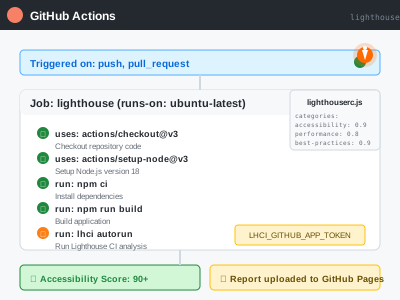
When I first noticed “two kinds of build runs” in my GitHub Actions, I wondered if something was wrong. One workflow would pass, another would fail, and I couldn’t understand why I had this apparent duplication. Turns out, this dual workflow structure is not just normal—it’s a best practice that dramatically improves both developer experience and deployment safety.
The Problem: Monolithic CI/CD Pipelines
Many developers start with a single, monolithic CI/CD pipeline that tries to do everything:
# ❌ The "Everything" Pipeline Anti-Pattern
jobs:
  test-build-deploy-everything:
    steps:
      - name: Run tests
      - name: Type checking
      - name: Security audit
      - name: Accessibility tests
      - name: Build
      - name: Deploy
      - name: Post-deployment tests
      - name: Slack notifications
      # ... 47 more steps
This approach creates several problems:
- Slow feedback loops - developers wait 15+ minutes for basic validation
- All-or-nothing failures - one failing test blocks everything
- Resource waste - running expensive operations on every PR
- Deployment coupling - can’t deploy without running every single check
The Solution: Separation of Concerns
After experiencing accessibility testing challenges and CI failures, I redesigned my pipeline architecture with two focused workflows:
Workflow 1: Fast CI Feedback (ci.yml)
name: CI
on:
  push:
    branches: [main, develop]
  pull_request:
    branches: [main]

jobs:
  setup-validation:
    strategy:
      matrix:
        node-version: [22.x]
    steps:
      - uses: actions/checkout@v4
      - name: Use Node.js ${{ matrix.node-version }}
        uses: actions/setup-node@v4
        with:
          node-version: ${{ matrix.node-version }}
          cache: 'npm'
      - name: Install dependencies
        run: npm ci
      - name: Run quality checks
        run: npm run quality:check
      - name: Build application
        run: npm run build
      - name: Start preview server
        run: npm run preview &
      - name: Run accessibility tests
run: npm run a11y:test:localPurpose: Provide rapid feedback to developers Focus: Essential validation that should block PRs Runtime: ~3-5 minutes
Workflow 2: Comprehensive Quality & Deploy (quality-and-deploy.yml)
name: Quality Checks & Deploy
on:
  push:
    branches: [main]
  pull_request:
    branches: [main]

jobs:
  quality-checks:
    steps:
      - name: Run Prettier check
      - name: Run TypeScript check
      - name: Run security audit
      - name: Build project
      - name: Setup Chrome and ChromeDriver
      - name: Run accessibility tests
        continue-on-error: true
        run: |
          # Comprehensive axe-core testing
          npx axe http://localhost:4321/ --exit
          npx axe http://localhost:4321/about --exit
npx axe http://localhost:4321/blog --exitPurpose: Thorough quality assessment and production deployment Focus: Security, comprehensive testing, deployment safety Runtime: ~8-12 minutes
Why This Architecture Works
🚀 Faster Developer Feedback
The CI workflow provides essential feedback in minutes, not hours:
git push feature/new-component
# ✅ CI workflow completes in 3 minutes
# ✅ Quality & Deploy runs in parallel
# Developer knows immediately if basic checks pass
🔒 Deployment Safety
The Quality & Deploy workflow includes extra safety measures:
- Security audits before any deployment
- Comprehensive accessibility testing across all pages
- continue-on-error for accessibility tests (prevents blocking while improving)
- Production deployment only on main branch
⚡ Parallel Execution Benefits
Both workflows run simultaneously, providing:
- Independent failure states - one can pass while the other fails
- Faster overall completion - parallel processing vs sequential
- Clearer failure attribution - immediately see if it’s a basic issue or deployment concern
🎯 Resource Optimization
Smart resource allocation based on workflow purpose:
# CI Workflow: Optimized for speed
strategy:
  matrix:
    node-version: [22.x] # Single version for speed

# Quality & Deploy: Optimized for thoroughness
steps:
  - name: Setup Chrome and ChromeDriver
    uses: browser-actions/setup-chrome@v1
  - name: Run accessibility tests
    continue-on-error: true # Don't block deployment
Accessibility Testing Integration
The dual workflow approach is particularly powerful for accessibility testing:
CI Workflow: Pa11y for Fast Validation
# Fast accessibility validation
npm run a11y:test:local
# Uses pa11y for rapid WCAG compliance checking
Quality Workflow: Comprehensive axe-core Testing
# Thorough accessibility analysis
npx axe http://localhost:4321/ --exit
npx axe http://localhost:4321/about --exit
npx axe http://localhost:4321/blog --exit
This approach ensures:
- Fast feedback on critical accessibility issues
- Comprehensive coverage without blocking development
- Progressive enhancement of accessibility compliance
Real-World Results
After implementing this architecture:
Before (Monolithic Pipeline)
- ❌ 15+ minute feedback loops
- ❌ Accessibility failures blocked all development
- ❌ Developers avoided running tests locally
- ❌ Deployment anxiety due to complex pipeline
After (Dual Workflow)
- ✅ 3-5 minute basic validation
- ✅ Accessibility improvements without development blockage
- ✅ Developers confident in rapid iteration
- ✅ Safe, automated deployments
Implementation Best Practices
1. Clear Workflow Naming
# ✅ Clear purpose in names
name: CI  # Fast feedback
name: Quality Checks & Deploy  # Comprehensive + deployment
2. Appropriate Trigger Events
# CI: Runs on all changes
on:
  push:
    branches: [main, develop]
  pull_request:
    branches: [main]

# Quality & Deploy: More selective
on:
  push:
    branches: [main]  # Deploy only from main
  pull_request:
    branches: [main]  # Test PRs targeting main
3. Fail-Fast vs Fail-Safe Strategies
# CI: Fail fast on critical issues
- name: Run quality checks
  run: npm run quality:check

# Quality: Fail safe on accessibility
- name: Run accessibility tests
  continue-on-error: true
  run: npx axe http://localhost:4321/ --exit
4. Environment Consistency
Ensure both workflows use the same Node.js version:
# Both workflows
node-version: '22' # Match local development
Common Concerns Addressed
”Isn’t this duplicated effort?”
No - each workflow serves a distinct purpose:
- CI: Developer productivity and basic validation
- Quality & Deploy: Production readiness and deployment safety
”Why not just make one workflow faster?”
Competing priorities: Fast feedback requires fewer checks, while deployment safety requires comprehensive validation. Trying to optimize for both in one workflow creates compromises that hurt both goals.
”What about resource usage?”
Parallel execution is more efficient: Two focused workflows running in parallel complete faster than one sequential workflow doing everything.
Conclusion
The dual workflow architecture transforms CI/CD from a bottleneck into an enabler. By separating fast feedback from comprehensive validation, you create a system that:
- Accelerates development with rapid CI feedback
- Ensures quality with thorough pre-deployment checks
- Enables safe deployments with comprehensive testing
- Scales with team growth through clear separation of concerns
Don’t fear the “two kinds of build runs” - embrace them as a sign of a mature, well-architected CI/CD pipeline.
Next Steps
Ready to implement dual workflows for your accessibility testing pipeline?
- Audit your current pipeline - identify fast vs comprehensive checks
- Split concerns - create separate CI and Quality workflows
- Optimize triggers - run appropriate checks for each event
- Monitor results - track improvement in developer velocity and deployment confidence
Building accessible applications requires both speed and thoroughness. The right CI/CD architecture gives you both.